As a Latvian custom software development company, Diatom has been working in web, mobile and desktop development since 2004. In 2016 we became deeply interested in robotics and automation and purchased our first humanoid robot, Pepper, in order to explore the opportunities of developing software for robots.
In this article, we would like to share our experience with the main issues we encountered while developing an application for Pepper for one of our clients, a dental clinic in the USA. The main goal was to develop the application to create a pleasant experience for the visitors of the clinics and attract new clients as well, work with data stored in a remote database, show this data on Pepper’s screen dynamically and update it in the database if necessary.
One of the main requirements from the client was to integrate Pepper with their existing application, which had information about their customers. That’s why our original plan was to keep minimal logic on the Pepper side and to use her more for data display. We aimed to use Pepper as an interface between the user and logic located in cloud services. We decided to build two API projects: one to get data from the client’s application and another to send and receive data from Pepper. Both APIs were connected to one database. To display information on Pepper’s tablet, we implemented a simple website hosted in the same cloud where the APIs were hosted.

Figure 1. Initial project architecture
Problems & JavaScript errors
The first problem that we encountered was that Pepper could not open our website. After some time we figured out that Pepper’s browser has some strong limitations related to JavaScript. Our solution was to keep JavaScript as simple as possible without using lambda expressions or other features that have appeared in JavaScript in the past few years.
Tablet internet connection issues
After we delivered the first version of the application to the client, we received a report that part of the website functionality was not working. Pepper could not load data from the API, and after relaunching the application, the problem repeated several times. It appeared that Pepper’s tablet had a bad WiFi module. We even received a recommendation from SoftBank’s support to use API requests as little as possible. (SoftBank is a Japanese company that co-designed the robot Pepper). After some time, we found out that the best solution was to move logic related to API requests from the website to Pepper’s behavior. We implemented a request manager in the Python scripts that were responsible for sending and receiving data in the JSON format. In so doing we established a stable connection between the API and Pepper.
Resource display on the tablet
The next problem appeared when we finished developing logic for dynamic resources such as images and videos. They would appear slowly on Pepper’s tablet, so we decided to move our website to the application resources and download all dynamic resources while the application was loading on Pepper. To do this we implemented functionality that would check if Pepper had the latest version of the website in the resource folder. If not, it would download an archive with the website and unarchive it to the resource folder. We implemented the same logic for the dynamic resources. Since all logic in Pepper’s application behavior was already finished, this approach allowed us to update the application on all the Pepper robots used by the client without reinstalling it.
Summary
After implementing all the above-mentioned solutions, we solved the described issues with JavaScript errors, the bad tablet internet connection and resource display on the tablet. As a final product, we received an application that checks the version of the website with each restart, and if something has changed, it downloads it. The benefits of this approach are that the website can be developed separately from the application installed on Pepper, and it is easy to do in the future without the need to reinstall the application itself on Pepper.
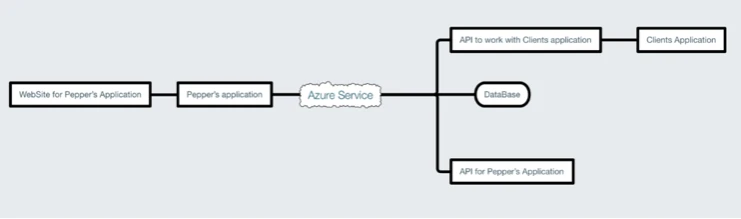
Figure 2. Final project after problem solving
Update (November 2026): The Choregraphe and Python approach described here belongs to NAOqi 2.5; Pepper robots on NAOqi 2.9 run Android apps built with the Pepper SDK for Android Studio. SoftBank paused Pepper production in 2020, the Aldebaran cloud services closed on 1 October 2026, and there is no official Pepper support center in Europe today. For the robot’s current status, see what Pepper can and cannot do.
We would like to add that in 2018 there was a lot of hype around Pepper in particular and AI and robotics in general. Together with creating emotional ties with customers, SoftBank Robotics was continuing to enhance Pepper’s technical features. At the time, we at Diatom were working closely with Pepper on a real commercial project and building our knowledge of software development for robots. If you have a robotics project in mind, feel free to reach out to us!
Technologies used: Choregraphe, .NET Core, Azure SQL database