
Almost any web project should have an admin part. Some web projects have an admin dashboard that takes nearly 50% or more of all functionality, especially in B2B projects. In such cases, it is important to use the best approach you can to develop the dashboard. Here are the most important front-end features you need to think about:
- Big dashboards should work fast. Data changes should not cause a web page to reload if possible.
- Some data in different places could be related, and this logic should be triggered on the fly.
- Generation of the view should be processed on the client side to decrease web traffic and server load.
- The client-side code in dashboards contains a lot of logic, so it should be well structured.
Cliizii Project
Our team just published a project called Cliizii, where admin dashboard logic takes nearly 55% of all its functionality. This is a B2B project for client and customer communication. It consists of two parts – dashboard and chat. It was a difficult challenge to make everything work according to the client’s requirements, but we did it. In this case, we used AngularJS to build the dashboard client-side, and this greatly facilitated our work. So how did AngularJS help with the four features mentioned above in the scope of our project?
1. Our project dashboard contains a few sections, and each of them contains a lot of options for the user. For example, in the Session Builder section, the user can set up a future chat session. There are a few types of sessions for different goals, and the user options depend on that type. AngularJS allowed us to create single-page applications and load web page content dynamically and quickly. This way we improved the UX and saved the time that the user would need to spend on setup.

2. We had a lot of cases where client-side behavior was related to data changes. For instance, using Social Forum types will disable the Date And Time option. Let’s go back to the previous example with Session Builder. This section is a wizard where the user can move from step to step. Each step depends on the previous one and at the same time data from one step can depend on other data from the same step. AngularJS helped us here with its models and conditions binding. As a result, we built a flexible UI where the user can see data changes in real time.
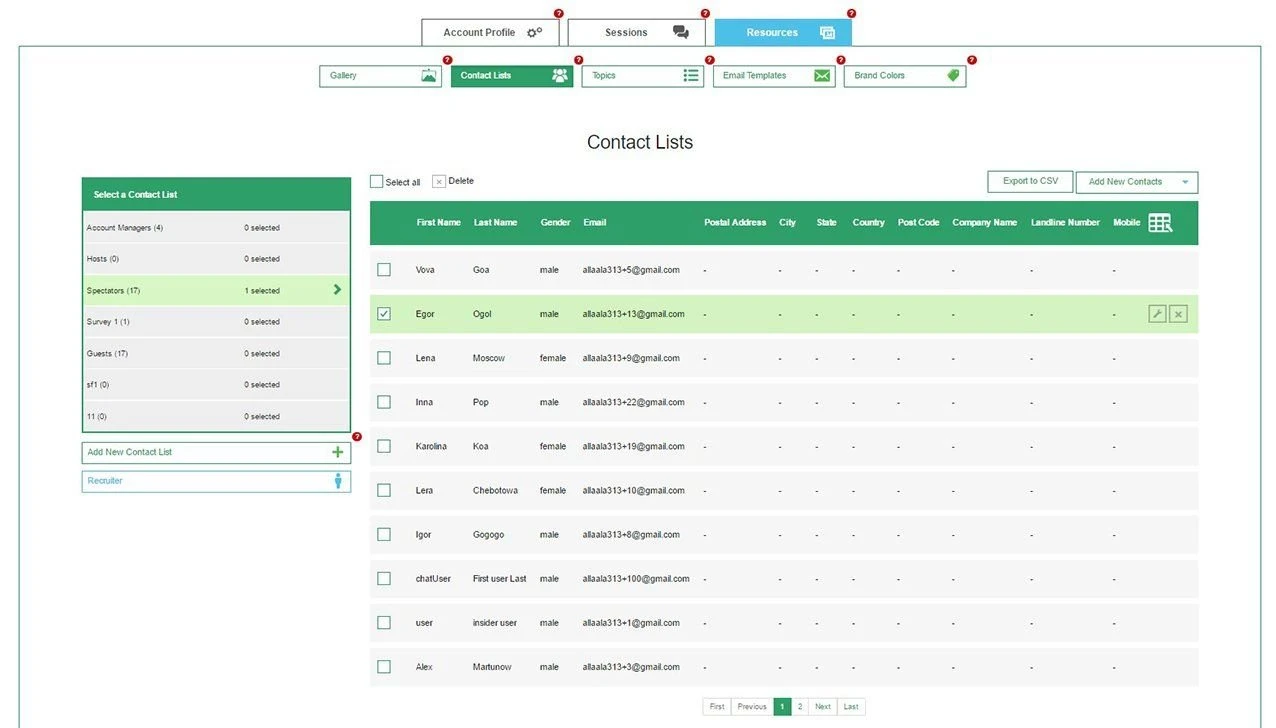
3. There were pages with a lot of UI components related to a record in the array of data. We used AngularJS to process UI generation based on template and events binding to attach related logic. We used this approach in the Contact List section, where contact data is stored, and it helped us decrease web traffic and server load.
4. Our project dashboard includes a lot of logic, and the AngularJS framework was a great solution to split the code between controllers, directives, services, etc. None of the developers had any problems working together with related features.
Update (November 2026): Google ended long-term support for AngularJS on 31 December 2021 and no longer releases fixes for it (see the AngularJS version support status). A new dashboard with these four requirements would use modern Angular, and AngularJS dashboards can move to it step by step with the official Upgrading from AngularJS guide.
AngularJS was good technology for this kind of project, and in 2017, if your project had all four features I described, it was the right choice. If you have any questions about the site itself, we will be happy to help you.