
First of all, what is Neo4j?
To sum this up, Neo4j is a NoSQL graph database implemented in Java and Scala, with an open-source Community Edition. Its roots go back to the early 2000s, and it became available as an open-source database in 2007. You can see it on GitHub. Neo4j is one of the market-leading graph databases; you can read more about it on their homepage and download Neo4j. Below, I show how to use Neo4j with Ruby on Rails.
What are the use cases of Graph databases and what we will be building?
A powerful feature of using a graph database is that you can create your own in-graph data structures, for example a linked list, basic friend finding based on social neighborhood or anything else that has complicated relationships.
As a huge football fan, I want to create an application for a football league with Neo4j, since this database is well suited to this kind of data. Our football league will have Leagues, Teams and Players. Leagues will have a level and many teams. Logically, teams will have players.
Setting everything up within a Rails project.
Let’s start from scratch and create new Rails project: rails new football_league
add 'neo4j', '~> 4.1.0 to our Gemfile and don’t forget to run bundle install.
Since Neo4j has an implicit schema, we don’t need migrations, so we can just delete db/migrate folder.
Next we will need to take care of our data layer. The goal here is to replace everything related to ActiveRecord with the Neo4j Ruby library. We need to make sure that all ActiveRecord libraries are excluded and all Neo4j libraries are included. Also, when we generate a new model, we need to make sure that it will be a Neo4j model.
Go to config/application.rb and let’s configure it:
require File.expand_path('../boot', __FILE__)

require "rails"

%w(
  neo4j
  action_controller
  action_mailer
  sprockets
).each do |framework|
  begin
    require "#{framework}/railtie"
  rescue LoadError
  end
end

Bundler.require(*Rails.groups)

module Neo4jForFun
  class Application < Rails::Application
    config.generators do |g|
      g.orm :neo4j
    end

    config.neo4j.session_options = { basic_auth: { username: 'your_username', password: 'your_password'} }
    config.neo4j.session_type = :server_db
    config.neo4j.session_path = 'http://localhost:7474'
  end
end
We replaced require rails/all with
%w(
  neo4j
  action_controller
  action_mailer
  sprockets
).each do |framework|
  begin
    require "#{framework}/railtie"
  rescue LoadError
  end
end
As I wrote, we don’t need to require everything anymore, because we don’t use migrations or ActiveRecord.
Also you can see in our application.rb file that it is using Neo4j configuration methods:
1) session_type we have two ways to run Neo4j: server_db and embedded_db
The gem supports both server and embedded modes.
Server: connecting to an external Neo4j database instance through the REST API.
Embedded: running Neo4j in the Ruby process.
The difference is that Server is supported by both MRI and JRuby, but Embedded is supported only under JRuby.
The advantage of embedded mode is direct access to the database via the Neo4j Java APIs, which gets you a lot more speed, but is more complex. One disadvantage is that your Ruby process is now your server process, so deployment and maintenance become trickier.
The advantage of the server mode is a clean separation of concerns. Connection via cypher queries is relatively simple.
2) session_path is the location of our database. We hook it up to http://localhost:7474 in development and test.
We are almost there. Before running our Rails server, let’s make some last changes to our Rails app.
Comment out the following lines:
config/environments/development.rb
# config.active_record.migration_error = :page_load
config/environments/production.rb
# config.active_record.dump_schema_after_migration = false
and it’s done. Now we can run rails s.
Congratulations, we have successfully configured our Rails application to use Neo4j as database.
How to declare relationships?
In Neo4j, every model object is a node, so all has_many/has_one method calls begin with declaration of direction. They can be :in, :out and :both.
Let’s start by creating the League model.
rails g model League name:string This generated for us:
class League
  include Neo4j::ActiveNode
  property :name, type: String

end
As you can see we don’t inherit from ActiveRecord::Base as usual, but we include Neo4j::ActiveNode.
Let’s create some leagues via the console and check what we get.
➜  football_league git:(master) ✗ rails c
Loading development environment (Rails 4.1.9)
2.2.1 :001 > League
 => League(name: String)
2.2.1 :002 > League.create(name: "League 1")
 => #<League name: "League 1">
2.2.1 :003 > League.create(name: "League 2")
 => #<League name: "League 2">
2.2.1 :004 > League.create(name: "League 3")
 => #<League name: "League 3">
Now we have created three leagues. Let’s see how they look in Neo4j. Open up http://localhost:7474/browser/ and there will be Node label called League. Click on it and you should see:

Now we have three leagues, but we don’t know which one is the highest league and which one is the lowest, so let’s add another field to our model called rank with type of Integer.
property :rank, type: Integer
Simply by adding the property class method on our League model, we have added a new attribute, rank.
Let’s update the rank, so that we know which league is higher:
2.2.1 :011 > League
 => League(name: String, rank: Integer)
2.2.1 :012 > League.where(name: "League 1").first.update_attribute(:rank, 1)
 => true
2.2.1 :013 > League.where(name: "League 2").first.update_attribute(:rank, 2)
 => true
2.2.1 :014 > League.where(name: "League 3").first.update_attribute(:rank, 3)
 => true
Let’s create the Team model and add relations to our Leagues.
rails g model team name:string
To your League model add: has_many :in, :teams, origin: :league and to the Team model add has_one :out, :league, type: :play_in.
We have declared relationships that each League can have many Teams and each Team has_one league. To see how this looks in our database viewer, add four teams to each league in the console.
Now in http://localhost:7474/browser/ we should see new Node label called Team and Relationship type called play_in. Let’s click on that.

Here you can see that each League now has four Tems.
Let’s take a closer look at one of the Leagues:
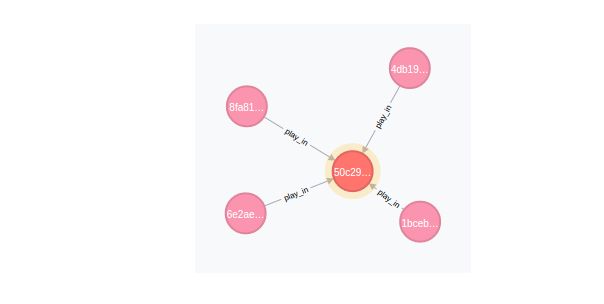
And if you click on a node you will see detailed information below.

In the console you would get the same data as plain text. So which one do you prefer, console or graphic presentation? I think the answer is obvious.
Now that we know how to create simple relations between models (nodes), let’s create Player model and add some players to each Team.
rails g model player first_name:string last_name:string
And don’t forget to add has_many :in, :players, origin: :team to your Team model.
I have already added 11 Players for each team the same way as we added Teams to League. Let’s check how it looks:

And a closer look at a single team:

Looks pretty good!
And finally, I want to create a relationship that goes both ways. Let’s imagine that a team can follow another team in order to see their progress or steal their players (I know, not cool, but it’s life).
We can do it in the following ways (this is the Team model from the project repository):
class Team
  has_many :both, :followers, type: :following
  has_many :out, :following, type: :following
  has_many :in, :followed_by, type: :following
end

# Another way to write the same "following" associations:
[[:both, :followers], [:out, :following], [:in, :followed_by]].each do |dir, assoc|
  has_many dir, assoc, type: :following
end
To see how this will look, let’s do a bidirectional relationship:

And now for the final picture, let’s see how it looks all together:

Conclusions
So, as you saw from this post, Neo4j is great for representing connected data, and it’s fast. In some ways I think these relations are easier to write and understand than ActiveRecord relations.
I will cover more on Neo4j with Rails in future posts and continue experimenting with this project; check it on GitHub: football_league
I would like to thank Brian Underwood (one of the Neo4j Ruby gem core developers) for taking time and reviewing this article.
Hope you enjoyed it.
Update (October 2026): The neo4j gem used here stopped at version 9.6.2 in April 2020. Its successor, activegraph, connects to the database over the Bolt protocol through the separate neo4j-ruby-driver gem: version 10 dropped the HTTP and embedded modes described above (see the activegraph changelog), and Neo4j 4.0 removed the REST API itself (see the Neo4j migration guide). Both gems are maintained, with releases in October 2026.