.NET 8 using for Blazor Development
Microsoft released .NET 8 on 14 November 2023 as an LTS release. Its .NET 8 Blazor updates were the largest since the framework appeared: one project template with render modes chosen per component, plus streaming rendering.
A Look Back at Blazor Before .NET 8
Before .NET 8, you chose one of two hosting models:
- Blazor WebAssembly App: runs in the browser on WebAssembly; Internet Explorer can’t run it, and without prerendering crawlers see an almost empty page.
- Blazor Server App: runs on the server, sends UI updates over SignalR, and holds a circuit in server memory for each open tab.
Introducing Blazor Web App in .NET 8
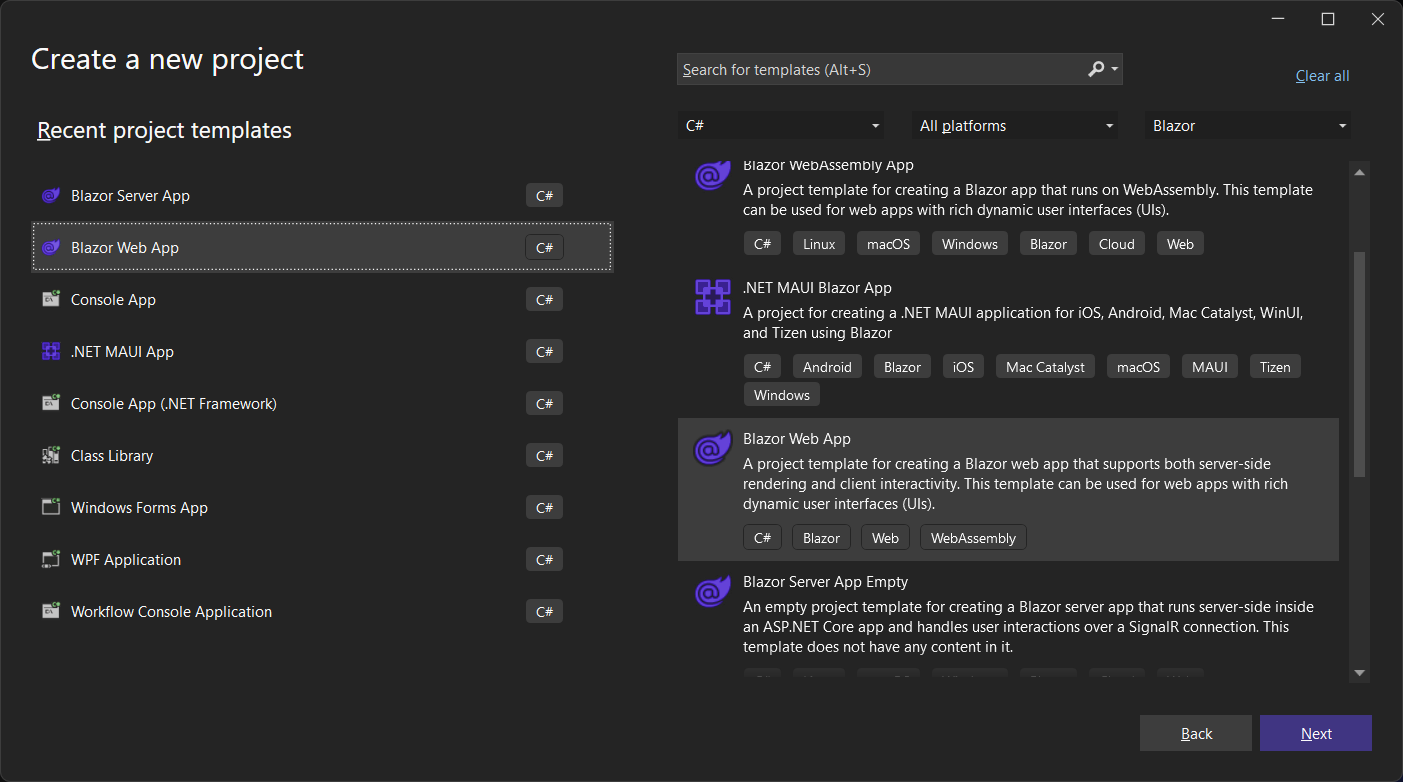
.NET 8 replaced both templates with the Blazor Web App, where you set the render mode per page or component:
- Static SSR: plain HTML, the default when no render mode is set.
- Interactive Server: events handled on the server over SignalR.
- Interactive WebAssembly: the component runs in the browser.
- Interactive Auto: starts on the server, then uses WebAssembly once the runtime is cached.
Static pages also get enhanced navigation and form handling: Blazor fetches the next page or form result and patches the DOM instead of reloading.
Streaming Rendering Explained
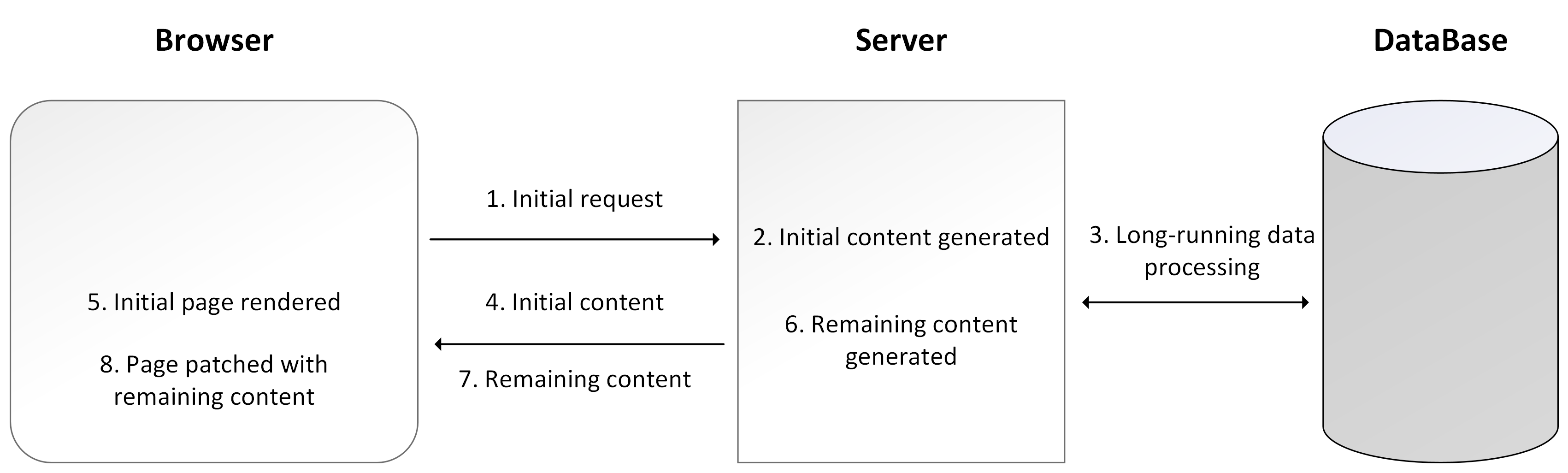
With static SSR, a page that waits on a slow query renders at once with placeholders; the finished markup then streams over the same response into the DOM.
Blazor Streaming Rendering
In the final .NET 8 release you apply a mode with the @rendermode directive:
- @rendermode InteractiveServer
- @rendermode InteractiveWebAssembly
- @rendermode InteractiveAuto
Release candidates used attributes such as @attribute [RenderModeAuto]; the RenderModeAuto attribute became @rendermode InteractiveAuto.
Auto first renders with Interactive Server while the .NET runtime and app bundle download and cache in the background; later visits run on WebAssembly. Auto components live in the client project, so their code must run on both sides. Microsoft lists the limitations here.
To enable streaming rendering in .NET 8, use @attribute [StreamRendering(true)]; from .NET 9, [StreamRendering] is enough.
Streaming Rendering Example and Explanation
Optimal Blazor Development Approaches
- Static SSR: content pages and anything that needs SEO.
- Interactive WebAssembly or Auto: admin dashboards and interactive pages.
- Interactive Server: internal tools on a reliable network, with no separate API.
- Streaming Rendering: reports that wait on heavy server-side queries.
Benefits of .NET 8’s Blazor Enhancements
For Developers:
- One C# codebase for content pages and interactive UI.
- Components move between server and browser by changing the render mode, not the code.
For Clients:
- One team builds the UI and the back end.
- Static pages load no WebAssembly runtime and hold no server circuit, so hosting stays light.
Our earlier article on software development with .NET 8 covers the rest of the release.
What Has Changed for Blazor Since .NET 8
.NET 8 and .NET 9 reached end of support on 10 November 2026 (.NET support policy) and no longer receive security patches. .NET 10, the current LTS release, and .NET 11 (STS, released 10 November 2026) are both supported until 14 November 2028. The .NET 8 Blazor improvements carried over; later releases added:
- .NET 9 (November 2024, our overview):
MapStaticAssets,RendererInfoto detect the render mode, static pages inside globally interactive apps, faster reconnection. - .NET 10 (November 2025, release notes):
[PersistentState], circuit state that survives disconnects,NavigationManager.NotFound, nested form validation, passkeys. - .NET 11 (November 2026, full .NET 11 overview): TempData and session values in static server rendering, a
DisplayNamecomponent,Virtualizefor items of different heights, QuickGrid paging and sorting kept in the URL.
Ready to Harness the Power of .NET 8 Blazor?
At Diatom Enterprises, our .NET development team builds custom Blazor software and moves older Blazor Server and WebAssembly apps to .NET 10. You can engage us for Blazor development services or Blazor staff augmentation services.
Contact us to discuss your project.